
.svg)
.svg)
Generating Leads with n8n: Is the Effort Worth It for Your B2B Sales?
%20(7).jpeg)
Generate B2B Leads with AI?
With LeadScraper, you create suitable B2B lists in seconds. 100% GDPR compliant. No subscription required!
CREATE TEST ACCOUNTAnyone working in B2B sales knows the feeling: spending hours compiling lists, researching contacts, and cross-referencing data. And in the end, you're left wondering if all that effort even yields the right contacts. No wonder automation tools like n8n are currently all the rage.
n8n promises to take over exactly this work: automatically finding, enriching, and pushing leads into the CRM . Sounds tempting. But what's the reality? What do you really need to generate leads with n8n? And is it worth the effort if you're not a tech professional?
This article transparently shows you what n8n can do for lead generation, where its limitations lie, and which alternative completely saves you the technical effort.
- n8n is an open-source automation tool that lets you collect, enrich and transfer B2B leads into your CRM via visual workflows, from sources like Google Maps, LinkedIn or Apollo.io. However, it requires basic technical knowledge, several API accounts and time for setup and maintenance.
- The biggest hurdles in lead generation with n8n are API limits, data quality and GDPR risks when web scraping. Without regular maintenance and debugging, hardly any workflow runs reliably over time.
- LeadScraper.de offers a ready-made, GDPR-compliant solution: AI-powered B2B lead generation via free-text prompt, with a self-learning algorithm and no technical effort.
What is n8n, and why do so many in sales use it?
n8n is an open-source platform for workflow automation.
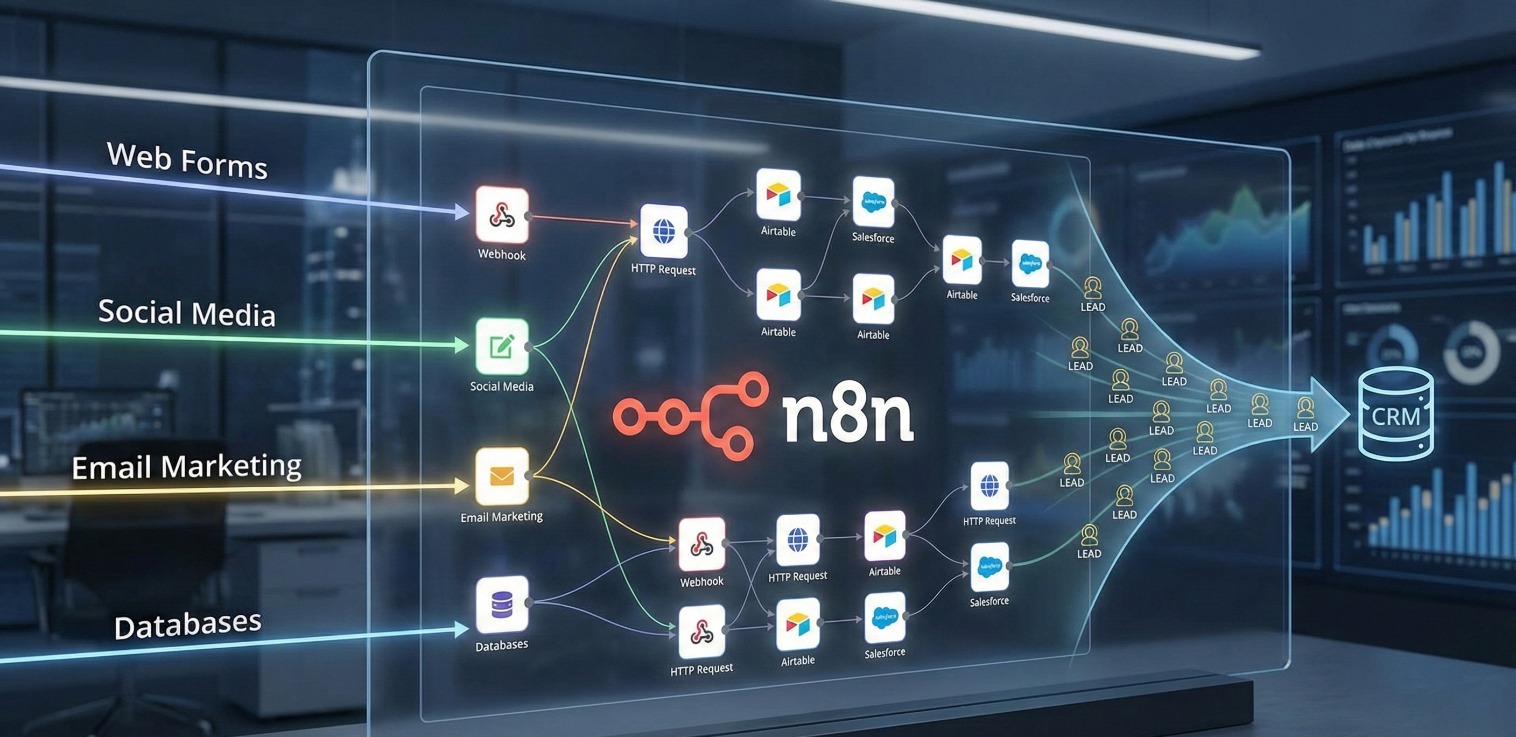
The principle: You visually connect various apps and services by arranging and linking so-called nodes (connection points) via drag-and-drop on a canvas. Each node performs a specific action, such as a Google Sheets query, an API call, or sending an email.
What's special about n8n: The software can be self-hosted. You can run it on your own server, maintaining full control over your data. Alternatively, a cloud version is available starting at approximately 24 Euros per month. The community provides over 500 ready-made workflow templates, including many specifically for lead generation.
Why do sales teams, in particular, turn to n8n?
Because manual lead research is time-consuming. Anyone who spends several hours a week Googling potential customers, gathering contact details, and maintaining Excel lists is looking for shortcuts. n8n promises exactly that: automated processes that run in the background and deliver fresh leads.
How lead generation with n8n works in practice
A typical workflow for B2B lead generation with n8n consists of several steps that run sequentially. Essentially like an assembly line, where each step automatically triggers the next.
Step 1: Find Leads.
The workflow searches a data source for potential contacts. Popular options include the Google Maps API ("Find all tax advisors in Munich"), Apollo.io for B2B contact data, or LinkedIn searches via third-party nodes.
Step 2: Data Enrichment.
The raw data is supplemented with additional information. Tools like Hunter.io add email addresses, Clearbit provides company sizes and industry affiliations, and AI models such as ChatGPT or Gemini extract missing contact details from company websites.
Step 3: Qualify Leads.
Here, the workflow separates the wheat from the chaff. You define criteria, such as minimum employee count, specific industries, or existing email addresses. Anything that doesn't fit is filtered out.
Step 4: Store and Process Leads.
The qualified contacts land in Google Sheets, Airtable, or directly in your CRM like HubSpot, Salesforce, or Pipedrive. From there, sales can take over or an automated outreach campaign can be launched.
Here you can find an example tutorial on how such a process can be set up:
API limits slow down the workflow.
Services like Apollo.io, Google Maps, or Hunter.io limit the number of queries per unit of time. In practice, this means: Your workflow starts, processes 20 leads, and then stops because the API limit has been reached. You'll need retry logic, waiting queues, and error handling to manage this. This significantly increases complexity.
Data quality depends on the sources.
n8n itself does not have its own database. The quality of your leads hinges on the connected data sources. Google Maps provides company listings, but no contact persons. Apollo.io has contacts, but some are outdated. Email addresses found by Hunter.io sometimes no longer exist. So you're working with a patchwork of different sources and have to validate the results yourself.
No learning system.
An n8n workflow does exactly what you've taught it to do. It doesn't learn. If certain leads don't fit your offer, you'll still repeatedly get similar results. There's no built-in feedback mechanism that improves quality with each use. Every refinement means: back to the workflow editor, adjust filters, test again.
Stitching together multiple tools.
For a complete lead generation process, you typically need five to ten different services that work together. Each service has its own pricing models, API documentation, and error messages. If one link in the chain fails, the entire workflow grinds to a halt. And troubleshooting across multiple nested nodes is anything but trivial.
Workflow maintenance is a continuous time investment.
Set it up once and forget about it? That rarely works. External APIs change their endpoints, data formats shift, and community nodes are no longer maintained. Anyone generating leads with n8n should plan to regularly check things and make adjustments.
n8n and GDPR: What to consider for B2B lead generation
Especially in German-speaking countries, the GDPR (General Data Protection Regulation) is a topic that sales managers cannot ignore. And this is where n8n workflows can quickly become tricky.
Many popular lead generation workflows rely on web scraping: Data is automatically extracted from websites, Google Maps, or LinkedIn. The problem: Even publicly accessible business data can contain personal data, such as contact names or email addresses. GDPR requires a legal basis for processing such data.
Particularly critical: LinkedIn scraping. LinkedIn prohibits automated extraction of profile data in its terms of service. Anyone who does so not only risks account suspension but also treads on thin ice regarding data protection laws. And precisely these types of LinkedIn scraping workflows are among the most used templates in the n8n community.
What does this mean for you? If you generate B2B leads with n8n, the responsibility for GDPR compliance lies entirely with you. You decide which data sources you tap into, how you process the data, and whether you can demonstrate a valid legal basis. n8n as a tool provides no built-in safeguards for this.
Generate leads without technical effort: LeadScraper.de as an alternative
What if you could generate B2B leads without building workflows, configuring APIs, or wrestling with data formats? This is precisely where LeadScraper.de comes in.
LeadScraper.de is an AI-powered SaaS tool specifically designed for B2B lead generation. Instead of complex workflow logic, you describe who you're looking for in your own words across five free-text fields.
For example: “I'm looking for B2B mechanical engineering companies in Southern Germany with 20 to 100 employees that export internationally."
LeadScraper's AI agents then search the internet in real-time and create a suitable contact list, including company name, website, email, phone number, and the correct contact person.
The key difference compared to n8n workflows: LeadScraper learns. After each request, you can rate individual leads with a thumbs up or thumbs down. This feedback is directly incorporated into the algorithm. The system recognizes patterns in your ratings and automatically adjusts future lead searches. With every use, the results become more precise and more relevant for your offering.
And data protection? LeadScraper.de works exclusively with publicly available business data from company directories, industry portals, and websites. No data is purchased or resold. Data collection and processing comply with GDPR, developed and operated in Germany.
LeadScraper's pricing model is transparent: You buy credits and use them flexibly. You only pay for the leads you actually generate.
n8n vs. LeadScraper.de in direct comparison
| Criterion | n8n | LeadScraper.de |
|---|---|---|
| Technical know-how | Medium-high (APIs, JSON, hosting) | None needed |
| Setup time | Several days to weeks | Ready to use instantly |
| GDPR compliance | Your responsibility | Built in |
| Data quality | Depends on third parties | AI-optimized with feedback |
| Learning logic | No (static workflows) | Yes (user feedback) |
| Cost overview | Server + various API costs | Credit-based, transparent |
| Maintenance effort | Regular (debugging, updates) | None |
| Audience definition | Fixed filters and search parameters | Free-text prompts |
Which approach is right for whom?
Both approaches have their merits. The question is: What suits your situation?
n8n is a good fit for you if you are tech-savvy, enjoy tinkering, and want to maintain full control over every step of your lead process. Perhaps you already have experience with APIs, a development team supporting you, or you're already using n8n for other automations. In this case, a self-built workflow can be a good solution.
LeadScraper.de is the better choice if you want results without getting bogged down in technical details. As a CEO or sales manager, one thing matters most to you: qualified contacts on the table that your team can immediately work with.
You don't want to invest your time in workflow debugging, but rather in conversations with potential customers. That's exactly what LeadScraper was developed for.
So ask yourself: Do you want to operate an automation tool or do you want to generate leads?
Conclusion: Generate leads with n8n or take the easier path?
n8n is a powerful tool. For tech enthusiasts, it offers almost limitless possibilities to automate processes. However, when it comes to B2B lead generation, it quickly becomes clear: The effort for setup, maintenance, and GDPR-compliant implementation is considerable. And the result remains a static workflow that doesn't learn from your feedback.
LeadScraper.de takes this effort off your hands. You describe your target audience, the AI delivers suitable leads, and with every piece of feedback, the system becomes more precise. GDPR-compliant, without technical hassle.
Want to see how it works in practice? Then test LeadScraper.de now and generate your first B2B leads in minutes.
Frequently Asked Questions about Lead Generation with n8n
Can I generate leads for free with n8n?
n8n itself can be run for free on your own server. However, the external services you need for lead generation (Google Maps API, Apollo.io, Hunter.io, OpenAI) have their own pricing models. Some offer free tiers, others don't. Therefore, lead generation with n8n is rarely completely free in practice.
Do I need programming skills to use n8n for lead generation?
Traditional programming like Python or JavaScript is not strictly necessary. However, you should understand how APIs work, what JSON data is, and how HTTP requests are structured. Without this basic knowledge, setting up a lead generation workflow will be a test of patience.
Is lead generation with n8n GDPR-compliant?
That depends on which data sources and methods you use in your workflow. n8n itself does not offer built-in GDPR protection. You are responsible for ensuring that your data collection and processing are legally sound. Especially when scraping LinkedIn or company websites, a prior legal review is advisable.
%2520(7).jpeg)